Healthcare workers and the general population alike probably give very little thought to how to print patient information, wristbands and labels. Lab technicians, clerical staff and other clinical staff utilize labels daily and expect clear, accurate and immediate printing capabilities. While some consumer laser printers can print waterproof laser/combo sheets, most generic printers in home-use settings are not capable of providing high-quality, waterproof and secure information required in healthcare facilities.
Printers used in healthcare need to be:
- a small footprint for desktops
- mobile for bedside printing
- fast
- durable
- low maintenance as there is no time for paper jams nor replacing ink cartridges
Luckily, this is all made possible by direct thermal and thermal transfer printers.
Related: 8 Healthcare Id Printer Myths Busted
Printers in Healthcare: Direct Thermal and Thermal Transfer
There are three printing methods primarily used in the healthcare setting: direct thermal, thermal transfer and laser printers. These printers handle the majority of wristband and chart label printing in hospitals. An increasing number of healthcare providers are moving away from laser printers to direct thermal and thermal transfer printers. As the name suggests, both direct thermal and thermal transfer utilize heat to print. The slight difference is that direct thermal printing uses chemically treated, heat-sensitive media to blacken when it passes under the thermal printhead, while the thermal transfer printer uses a heated ribbon to melt the ink onto the media. Both are great options for wristbands and labels. They can also print barcodes, icons, text and images but have distinct differences and benefits.
Direct Thermal Printers
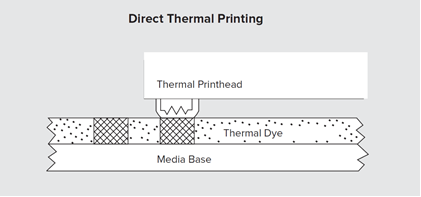
How they work: Keeping the keyword “direct” in mind, direct thermal printers use heat to apply markings directly to paper via the thermal printhead. They require the use of direct thermal labels which have a heat-activated thermal dye coating. When the label coating comes into contact with the heated printhead, it transfers the specified image or text.
Advantages: Many consider direct thermal printers simpler to use because they do not require ink, toner, or ribbon components. For this reason, they can be long-lasting printers as long as they are kept in cool environments. Since they have fewer moving parts, they are often more compact and mobile, making them ideal for bedside printing.
Drawbacks: Labels printed from a direct thermal printer are sensitive to severe heat (>165oF) and may become hardened and fade over time or if exposed to sunlight, fluorescent or UV lighting. They are also not resistant to abrasions or contact with water or chemicals. However, it should also be noted that there are new direct thermal materials which can last up to 18 months outside in rain, UV, heat, isopropyl alcohol, hand sanitizer and other harsh chemicals, which makes them useful in long-term healthcare applications as well.
Best suited for: Labels printed via direct thermal are traditionally not meant to last for long periods of time, usually a maximum of six months. Direct thermal labels are commonly used for shipping labels, receipts, and perishable goods. Due to their limited lifespan, they are a great solution for short-term patient wristbands and barcode scanning.
Maintenance considerations: Direct thermal printers are often low-maintenance since there are fewer parts to fix or replace. This keeps costs low and also increases the reliability in operation.
Thermal Transfer Printers
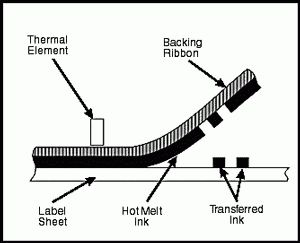
How they work: Thermal transfer printers operate by using wax or resin-based ribbons that melt the ink onto media. Since the media absorbs the ink rather than just sitting on the surface it produces a long-lasting, high-quality printing.
Advantages: The biggest advantage is that thermal transfer offers the highest-quality and most durable printing available. As long as the correct type of media is matched with the ribbon, the ink is smudge-proof and impermeable to heat and moisture. Perfect readability and scannability are highly important in the healthcare setting. There is little time for reprinting, and errors can have disastrous effects. Thermal transfer and direct thermal printers also offer the option to print in color depending on the base material selected.
Drawbacks: While thermal printers deliver the option to print on paper, plastic or polyester, the media chosen must correspond with the ribbon to ensure the best print quality.
Best suited for: Thermal transfer is the best option for long-term label use as the ink remains intact even in contact with chemicals and harsh environments. Ideal situations include laboratory specimens that may come into contact with fluids, blood bags, chemical labeling, freezer storage and permanent identification.
Maintenance considerations: Thermal transfer printers require ribbons, which increases the cost. If the ribbon is not compatible with the label material it could cause internal problems.
Other Printer Options: Inkjet and Laser
Inkjet printers
These are the cheap printers most people are familiar with and likely have in their home offices. Due to the high cost of ink and maintenance, these printers are not ideal for healthcare.
How they work: Inkjet printers work by spraying thousands of tiny ink droplets onto paper to create text and images.
Advantages: Inkjet printers are very inexpensive and are useful in printing colorful images.
Drawbacks: Slow printing process and high cost of replacing ink cartridges.
Best suited for: Home use and less than daily printing needs.
Maintenance considerations: Inkjet printers require regular printing or the nozzles may become clogged.
Laser Printers
How they work: Laser printers use a toner that is essentially a powder that melts onto paper.
Advantages: Laser printers have a longer lifespan than inkjet printers and a much faster printing speed. They are also able to print in mass amounts, such as when making copies.
Drawbacks: Laser printers have a higher upfront cost and require costly toner cartridges. From an environmental standpoint, toner is harmful to humans and contributes to pollution*.
Best suited for: Best for office use or more frequent printing. Laser printers can be found in healthcare settings when there is a need to print companion labels, laser wristband/combo sheets, forms or regular-sized paper, such as when printing discharge summaries.
Maintenance considerations: Regular (often overlooked) maintenance can keep a laser printer working smoothly for years. This can include removing paper trays and the toner cartridge to wipe or vacuum dust and debris from hard-to-reach areas and wiping down the rollers with a damp cloth.
Helpful Tips to Maintain Printers in the Healthcare Setting
Keep It Clean
Routine maintenance – at least once a month – is ideal to keep printers functioning properly. This includes cleaning and inspecting. Printers accumulate dust and debris which affects their printing ability. This is also a great time to review the printer’s settings. Adjusting the heat setting, print speed and ink usage will increase the efficiency and life of the printer as well as the printhead of direct thermal and thermal transfer printers.
Keep a Log
Healthcare facilities likely have more printers than one would imagine. From handheld mobile printers lab technicians use to large freestanding laser printers in the billing department, printers are an essential yet often neglected piece of equipment. For this reason, it is vital to keep a maintenance log of every printer to keep track of completed and upcoming maintenance. Depending on the department and usage, some printers may require more frequent maintenance than others.
Keep a List
Keeping track of supplies and their condition is vital to the longevity of printers. Using expired or inferior cartridges, labels and ribbons is the biggest cause of printer failure and poor print quality. Choosing cheap, remanufactured supplies saves money in the present but will lead to costly printer maintenance or replacement in the future.
For more information on programming and troubleshooting your printer, check out Caresfield Printer Hardware FAQ Guide.
Caresfield is your one-stop shop for printer supplies and maintenance. We are proud resellers of Zebra brand printers. From industrial to mobile printing, direct thermal or thermal transfer, our printers can serve all your needs. We also offer an array of printing supplies, including wax and resin ribbons in the exact size required for seamless printing, as well as direct thermal wristbands with UV coating to withstand moisture.
Bio: Maegan Wagner, BSN RN CCM has over 10 years of healthcare experience. Her nursing career has led her through many different specialties, but her passion lies in educating through writing for other healthcare professionals and the general public.
* Photocopiers that make use of toner ink emit high levels of ozone during electrical discharges. Regular exposure to ozone is synonymous with a multitude of health problems, including headaches, nausea and dermatitis, as well as severe irritation in the throat, lungs and eyes.
https://smallbusiness.chron.com/dangers-toner-ink-exposure-55298.html